Documents & resources
Printable checklist generator
Use the checklist generator for service, cleaning or product-launch tasks. Edit the actions and download a real PDF with checkboxes and a completion record.
- Free to use
- No account needed
Your printable checklist
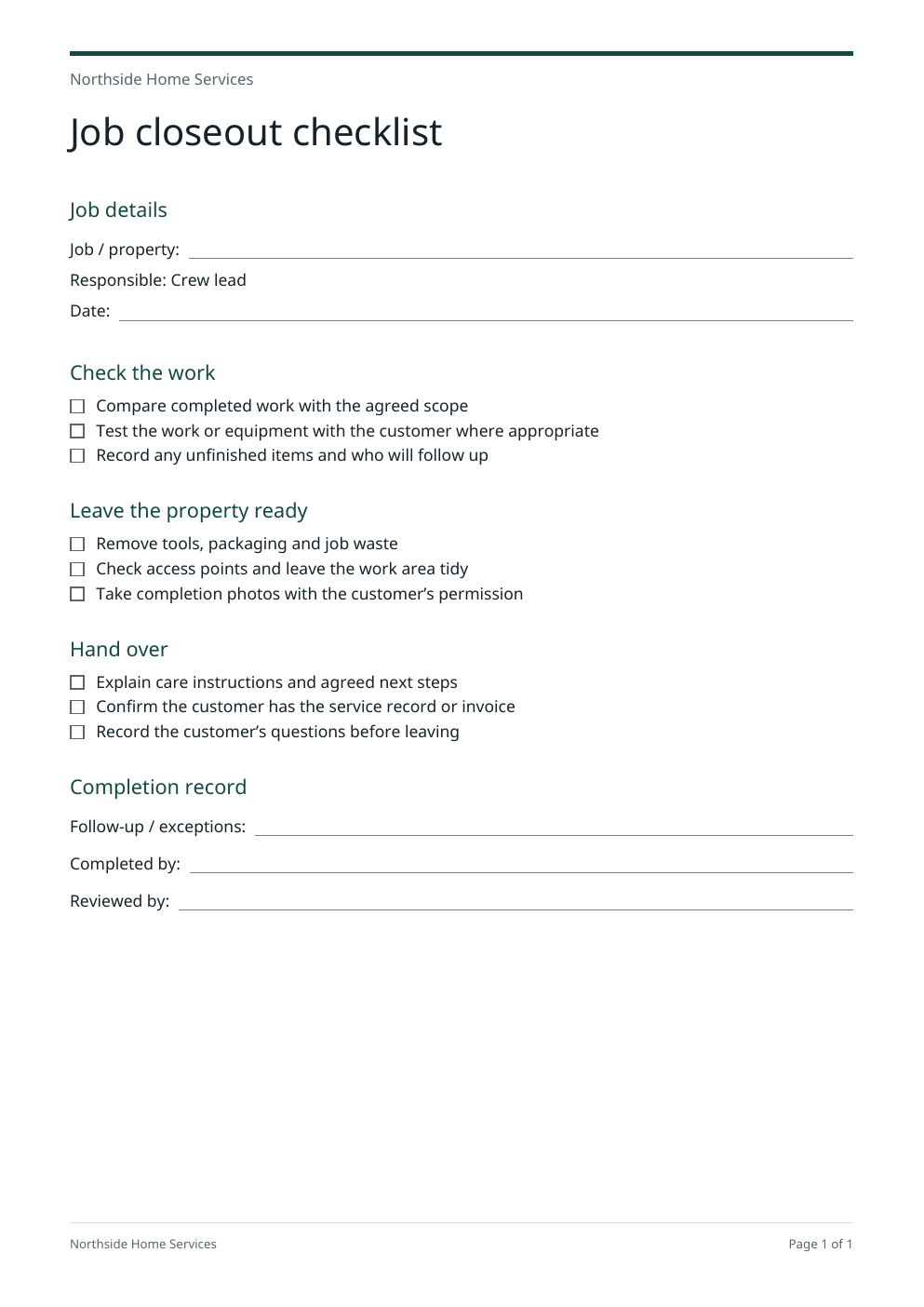
A4 pages with real checkboxes, room for exceptions and a completion record. Your checklist is prepared in this browser. Download a copy to keep it.
Your checklist
Review every task against your own scope. These starting checklists are practical prompts and do not certify safety or regulatory compliance.
Use it from an AI browser
This page has site tools: actions an AI agent can call directly, with no plugin or API key. The ChatGPT desktop app’s browser can use them where site tools are available, and so can Chrome with WebMCP turned on. The agent works on this page, with the same steps and limits as its buttons, so you can check the result before you use it.
Open doany.ai/tools/checklist-generator and make a printable end-of-tenancy cleaning checklist for Fresh Start Cleaning Co. with kitchen, bathroom and bedroom sections, with the crew lead as the responsible person.
Site tools work only while this page is open. They never send messages, invoices or payments for you.
Build an actionable handover with the checklist generator
The checklist generator helps you organize observable actions in the order they happen. Start with the visible job closeout sheet, then replace its wording with your own process.
Choose the starting process
Keep service job closeout or choose cleaning handover or digital product launch. If you have edited the list, the checklist generator lets you keep your edits or replace them with the selected process.
Edit the actions and job details
Set the title, responsible role and job or product reference in the checklist generator. Use one action per line. Start a heading with # and move lines to change their order. Remove anything outside the actual scope.
Update and download the PDF
Create the PDF from your current details, check the preview and download it. A4 pages include checkboxes, date space, exceptions and a completion record. Print the PDF from your normal PDF viewer.
Make the checklist fit the handover
The starting content changes by process. Every task remains editable; the checklist does not verify that work has been completed.
A trade job closeout
What to change
Use the checklist generator to list the agreed scope, functional checks, waste removal and care instructions for this job. Name the person responsible for unresolved work.
Before you use it
Keep regulated inspection, safety and certification requirements in your established process.
A cleaning team handover
What to change
Adjust the rooms, booked add-ons, inaccessible areas, key return and next-visit wording to match the booking.
Before you use it
Describe what was agreed and record exceptions rather than promising every task was completed.
A creator’s product launch
What to change
Choose the checklist generator launch preset for deliverables, checkout, delivery links, support information and launch-day ownership.
Before you use it
Run the actual purchase and download journey. A ticked box is a record, not proof that a checkout works.
Review your checklist generator sheet before printing
- Use short actions someone can observe and complete.
- Keep the steps in the order your team will follow.
- Include an owner and a way to record exceptions.
- Update the PDF after your last edit, then download it to keep the file.
The PDF follows your edited task list
The checklist generator turns each nonblank task line into a drawn checkbox and an action. Lines beginning with # become section headings. The PDF wraps long tasks and continues onto another A4 page when necessary. It keeps selectable text rather than flattening the sheet into a screenshot.
A completion record makes exceptions visible
The document includes date space, a responsible role, a place for follow-up or exceptions, and completed-by and reviewed-by lines. Use those fields to identify unfinished work. They do not automatically collect a signature or certify compliance.
Keep your own copy
Editing and PDF preparation happen in this browser. The checklist generator does not send, publish or save the list to a workspace. Download the file before leaving or reloading the page. The downloaded PDF is the completed print document; return to this editor to change its task text.
Sources checked on October 4, 2026: Printable Toolkit: grouped local checklist editing and exportsChecklist.com: checklist notes and PDF downloadsopens in a new tab
Questions about this tool
How do I make a printable checklist?
Choose a starting process in the checklist generator, edit the job details and put one task on each line. Use # for a section heading. Update the PDF, review the preview and download the file. Print it using your PDF viewer.
Can I edit, add or remove checklist tasks?
Yes. Every line in the task box is editable. Add a line for a task, delete a line to remove it and move lines to change their order. The checklist generator accepts up to 60 tasks and 12 sections, with up to 220 characters per task or heading.
Can I download the checklist without an account?
Yes. The visible starting checklist and any PDF you prepare here can be downloaded without signing in. Copy also gives you the current task text for another document editor.
Does it generate a real PDF with checkboxes?
Yes. PDF preparation creates an A4 document with selectable text and drawn checkboxes. The generated preview and download use the same PDF bytes. After edits, the old download is hidden until you update the PDF.
Are the checkboxes interactive in the PDF?
They are printable boxes for marking on paper or annotating with a PDF viewer. The checklist generator does not create fillable PDF form controls, collect signatures or track completion online.
Is my checklist saved automatically?
No. The editable content stays in the current page and PDF preparation happens in this browser. Reloading or leaving can reset your work. Download the PDF or copy the task text to keep it. This tool does not create a cloud-saved checklist.
Can I use it for cleaning, trade jobs or a product launch?
Yes. Choose service job closeout, cleaning handover or digital product launch, then change every action to match your scope. When you switch after editing, you can keep your work or deliberately replace it. These starting lists are not safety, inspection or regulatory checklists.
How do I change the checklist after downloading?
Change the title, details or tasks in the checklist generator, then update and download a new PDF. The PDF is a print document and not the editable source list. Copy the task text to keep editing in Word, Google Docs or another tool.