For creators and small businesses
Free AI lead magnet generator
Use the lead magnet generator to make a useful checklist, worksheet or short guide, plus opt-in copy and a delivery message.
- Free to use
- No account needed
Your downloadable resource
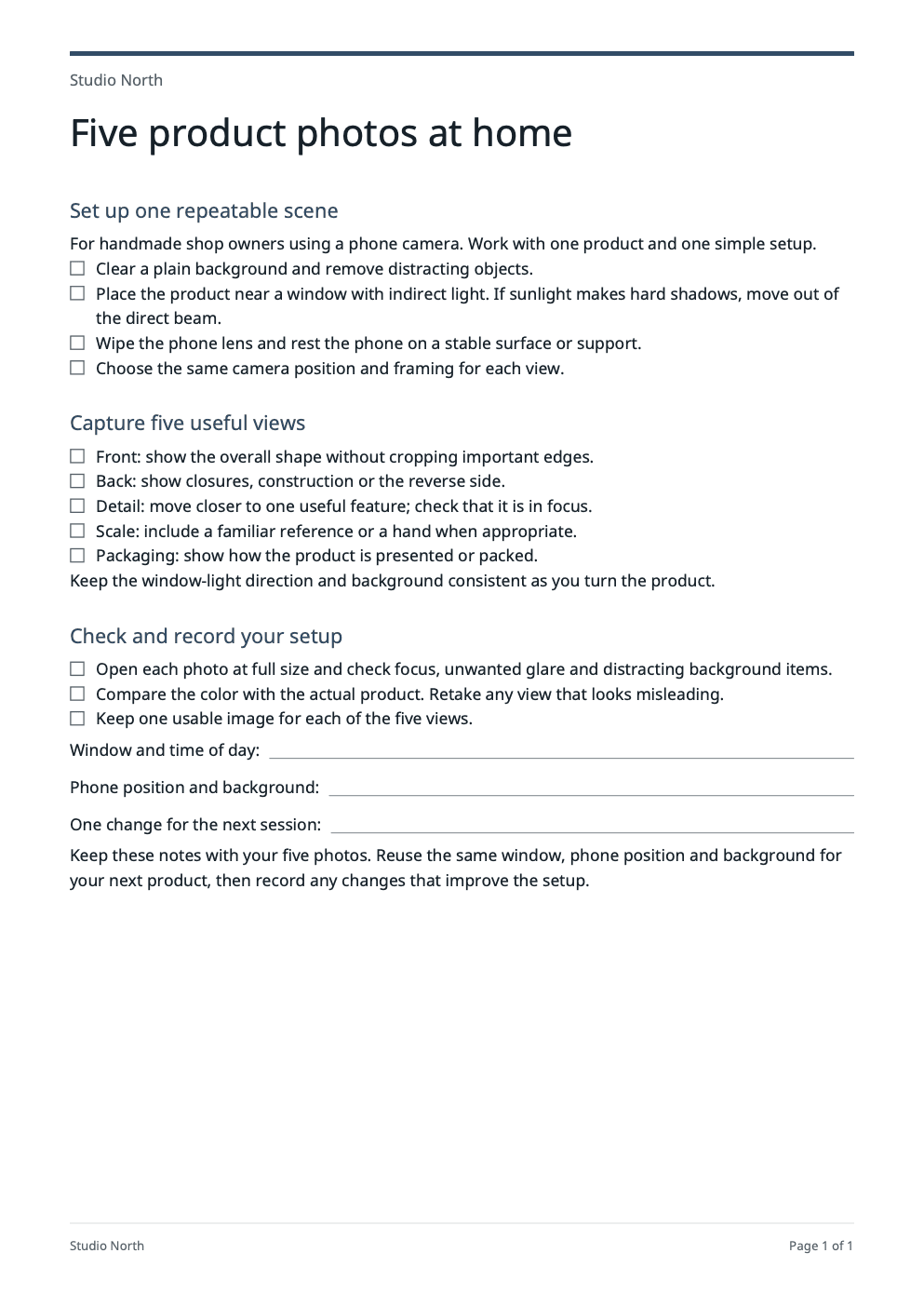
A one-page checklist PDF to give away, with its opt-in copy and delivery message below.
Use with your resource
Paste these into your sign-up form and the email that sends the file.
Opt-in copy
Headline: Make your next product-photo session easier. Get the five-photo home setup checklist. - Prepare a simple window-light scene with your phone. - Capture front, back, detail, scale and packaging views. - Record your setup so you can repeat it next time. Button: Get the checklist
Delivery message
Subject: Your five-photo setup checklist Your five-photo setup checklist is attached. Start with one product, indirect window light and a stable phone, then work through the five views. Keep your setup notes with the photos so your next session is easier. Studio North
Edit documentTitle and 5 sections
More optionsSave, download text or start over
PDF branding
Keep a copy
Save a private draft for 24 hours. Sign in or create an account to reopen it.
Start over
Clearing the form also removes this draft.
Your details
Use it from an AI browser
This page has site tools: actions an AI agent can call directly, with no plugin or API key. The ChatGPT desktop app’s browser can use them where site tools are available, and so can Chrome with WebMCP turned on. The agent works on this page, with the same steps and limits as its buttons, so you can check the result before you use it.
Open doany.ai/tools/lead-magnet-generator and create a checklist called "Five-minute desk stretches" for Peak Form Physio in Denver, aimed at office workers with lower-back pain so I can download it as a PDF.
Site tools work only while this page is open. They never send messages, invoices or payments for you.
Use the lead magnet generator to give your audience one useful win
A lead magnet is a resource someone can use in exchange for joining your list. Give the lead magnet generator a specific problem your customer can solve, check or refer to. Make the signup promise match the resource they will receive.
Narrow the audience and the outcome
In the lead magnet generator, replace “Business or creator name” and “Your expertise”, then be specific in “Who is this for?”. Use “Topic” for one task and “One useful outcome” for what the reader can do afterward, such as prepare five product photos or organize questions before a site visit.
Add your method and choose a format
In the lead magnet generator, use “Your advice and confirmed facts” to supply the steps, prompts and boundaries you actually teach. Put unsupported claims or topics in “What to avoid”. Choose a “Resource format” based on how the reader will use it: tick actions, write answers, follow a short sequence or consult a compact reference. Avoid including client secrets.
Edit the asset and the signup promise together
Confirm your facts and use the lead magnet generator to create the resource. Review the resource sections, “Opt-in copy” and “Delivery message”. Make sure the headline promises only what the download contains. “Edit document” opens the content for changes. Use “PDF branding” in “More options” for your name, footer and accent color, then refresh the preview and inspect the PDF before downloading.
Choose the format the reader will actually use
The lead magnet generator’s four formats suit different tasks. Keep it focused enough to finish and useful enough to keep.
Checklist for a repeatable task
What to change
A photography coach can list the checks for a phone-camera product shoot. A home-service business can list preparations before a visit. Give the lead magnet generator actions the reader can complete and tick off.
Before you use it
Each item is observable, specific and within the reader's control.
Worksheet for a personal decision
What to change
A creator can help readers choose a content topic; a contractor can help customers organize project priorities. Supply prompts that require their own answers rather than paragraphs of general advice.
Before you use it
Check that the lead magnet generator’s prompts and answer space are usable in the finished PDF.
Quick-start guide for a short sequence
What to change
Walk a beginner through one narrow setup, such as preparing a simple window-light photo station. Give the lead magnet generator the order, necessary materials and checks that show the setup is ready.
Before you use it
A first-time reader can follow the steps without needing a full course.
Cheat sheet for a compact reference
What to change
Collect useful reminders, definitions or repeatable rules for your audience. Add brief context so readers understand when the advice applies.
Before you use it
Readers can find the relevant point quickly and understand when it applies.
Check the PDF from the lead magnet generator before offering it
- The audience, task and promised outcome are specific and realistic.
- The resource contains useful actions, prompts or reference material from your method.
- The PDF is readable, correctly branded and reflects the latest edits.
- The signup copy and delivery message describe the actual asset and your intended delivery process.
Create the asset, then the signup copy
Choose one narrow problem and a format the reader can use immediately. A checklist needs actionable steps; a worksheet needs prompts and space to answer. The lead magnet generator creates the resource content, an opt-in headline and bullets, and a delivery message draft.
A downloadable resource you can own
In the lead magnet generator, edit the sections, preview the PDF and download it without an account. Brand it with your name and a footer. The opt-in and delivery sections stay outside the resource PDF so your readers receive the asset itself.
Build a product-photo checklist
A photography coach helps handmade shop owners prepare one phone-camera setup. A useful checklist asks the reader to clear the background, choose indirect window light, stabilize the phone, photograph the front, back and details, and check focus and color. A worksheet can add “Which window and time worked best?” followed by answer space. The opt-in promise should describe this setup checklist; the download should contain the resource itself.
Useful answers
What is a lead magnet, and how does it help a small business?
A lead magnet is a useful free resource offered to prospective customers, often when they join an email list. It should solve one problem related to your paid service or product. A photographer could offer a product-photo checklist; a contractor could offer a project-planning worksheet. The lead magnet generator creates the resource and signup copy, but downloads alone do not guarantee paying customers.
How do I create a lead magnet with AI?
Give the lead magnet generator your expertise, audience, topic and “One useful outcome”. Add your own method in “Your advice and confirmed facts”, then choose a “Resource format” and create the resource. Edit the sections, opt-in copy and delivery message together. Preview the PDF and check that a reader can complete the promised task before downloading it.
What are good lead magnet ideas for creators, coaches and local services?
Give the lead magnet generator a task your prospective customer already needs help with. A creator could offer a phone-camera photo checklist, a coach a goal-setting worksheet, a cleaner a pre-visit preparation guide and a landscaper a garden-planning cheat sheet. Match the topic to your actual expertise and paid offer; do not promise results you cannot support.
Should I make a checklist, worksheet, quick-start guide or cheat sheet?
Choose “Checklist” for actions readers can tick off, “Worksheet” for prompts they answer, “Quick-start guide” for a short sequence and “Cheat sheet” for a compact reference. These are the four supported formats. A worksheet can provide repeatable prompts, but the lead magnet generator does not create a full course, image pack or interactive calculator.
How do I make a lead magnet specific instead of generic?
Name one audience and one realistic outcome, then supply the steps and boundaries you actually teach. Replace broad advice such as grow your business with a task such as prepare five product photos using a phone. Remove filler and check that every section helps complete that task. The lead magnet generator does not research or verify your method.
What is included in the downloadable lead magnet PDF?
The PDF contains the resource itself. “Opt-in copy” and “Delivery message” stay outside it so your readers receive the asset rather than your signup instructions. After changing content or branding, refresh the PDF preview and inspect the latest version before downloading.
Can I customize the lead magnet branding and language?
“PDF branding” in “More options” lets you change the brand name, footer and accent color. You can edit the resource text directly. Choose English, Spanish, French, German, Portuguese or Chinese in “Output language” before generating. Review the wording and refreshed PDF yourself; the lead magnet generator does not design a logo or add custom images.
Does this tool collect emails or automatically deliver the lead magnet?
No. The lead magnet generator creates a resource, opt-in copy and a delivery message draft. Set up your own signup form and authorized delivery workflow, then check the download link and message before offering it to subscribers. Generating a PDF does not create a landing page, subscriber list or email sequence.
How do I connect a lead magnet to my paid service or product?
Help the same audience with a small task that naturally leads toward your paid offer. A product-photo checklist can introduce photography coaching; a project-planning worksheet can prepare a customer for a consultation. Make the signup promise match the resource. Plan your next message in your own delivery system and check whether subscribers take the next step.
Is this lead magnet generator free, and do I need an account?
The lead magnet generator lets you edit, copy and download without an account. AI generation uses a free allowance; if it is temporarily full, your existing work remains editable. Direct edits do not use AI. Sign in or create an account to reopen a saved private draft, which lasts 24 hours. Keep a downloaded copy if you need the resource longer.