For service businesses
Free service estimate generator
Use the service estimate generator to turn job details into an editable estimate, with your prices, scope and a customer-ready PDF.
- Free to use
- No account needed
Your customer estimate
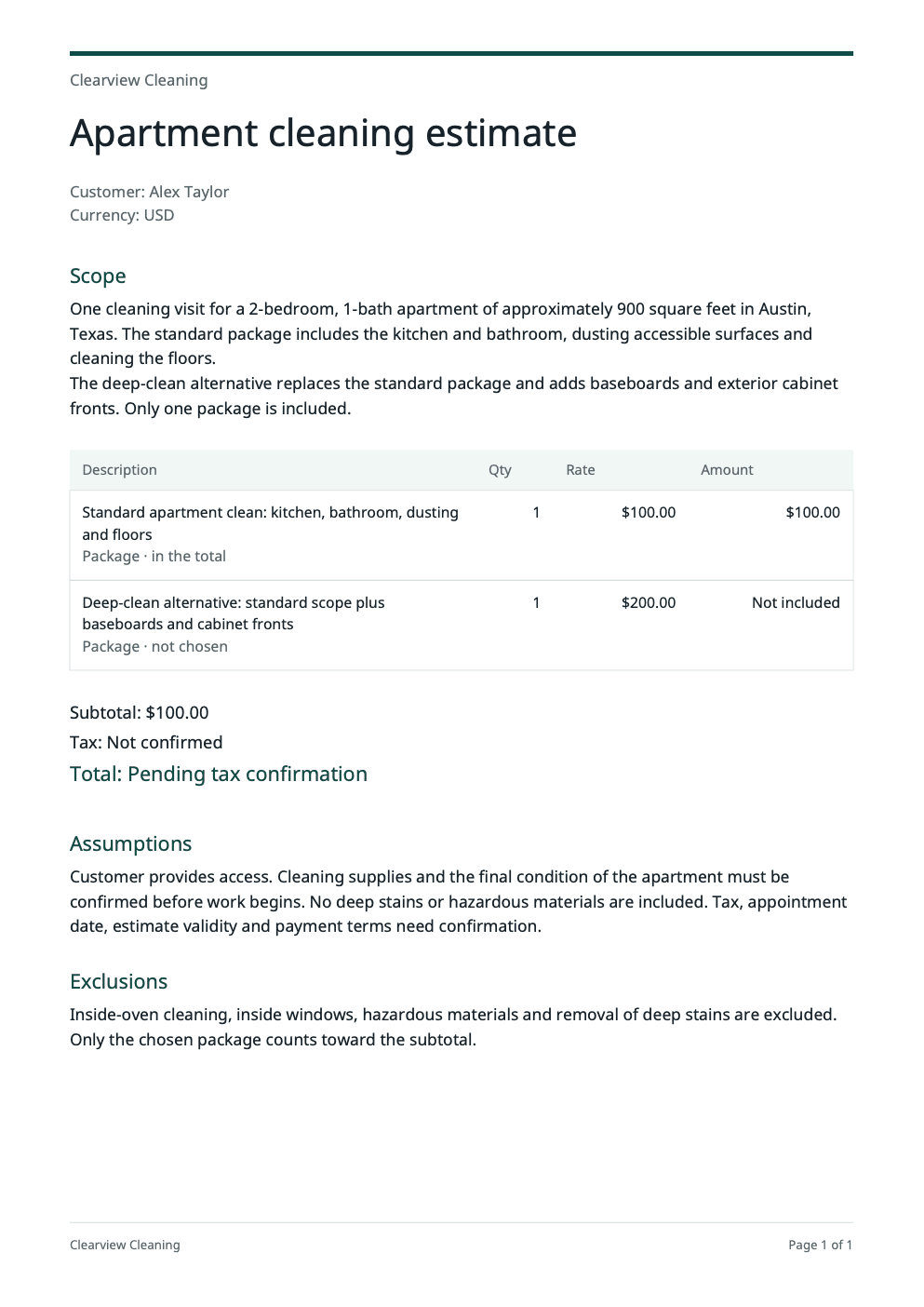
A customer-ready PDF estimate for an apartment clean.
Total before tax$100.00
Edit documentTitle and 3 sections
More optionsSave, download text or start over
PDF branding
Keep a copy
Save a private draft for 24 hours. Sign in or create an account to reopen it.
Start over
Clearing the form also removes this draft.
Total before tax$100.00
Your details
Your estimate prices
Enter the prices you agreed for this job. They appear on the customer PDF.
Customer and currencyAlex Taylor · USD
Items2 items · $100.00
Not sure what to charge?
Work it out from your costs in the service pricing calculator. Its “Use this price in an estimate” button adds the price here for you and keeps what you typed.
Line total: $100.00
Package · in the totalStandard apartment clean: kitchen, bathroom, dusting and floors1 × $100.00
Line total, not in the estimate total: $200.00
Package · not chosenDeep-clean alternative: standard scope plus baseboards and cabinet fronts1 × $200.00
Discount and taxNo discount · tax not confirmed
Tax is worked out after the discount.
- Subtotal
- $100.00
- Tax
- Not confirmed
- Total before tax
- $100.00
Total before tax$100.00
Use it from an AI browser
This page has site tools: actions an AI agent can call directly, with no plugin or API key. The ChatGPT desktop app’s browser can use them where site tools are available, and so can Chrome with WebMCP turned on. The agent works on this page, with the same steps and limits as its buttons, so you can check the result before you use it.
Open doany.ai/tools/service-estimate-generator and draft an estimate for Brightline Handyman in Boise to mount two TVs and patch a drywall hole for customer Rosa Diaz, with 3 hours of labor at $85 an hour, $40 of materials and 6% tax.
Site tools work only while this page is open. They never send messages, invoices or payments for you.
Use the service estimate generator to build a clear offer
A useful estimate tells the customer what you will do, what it will cost and what could change. Use the service estimate generator to turn your job notes into clear scope, then pair that scope with the selling prices you set. The PDF is the document you can review with your customer.
Describe the work you have agreed to do
In the service estimate generator, choose a “Service type” to see its scope questions, then describe this customer’s job in “Job details”. For cleaning, include rooms, size, cleaning level and visit frequency. For outdoor work, describe surfaces, access and condition. Put uncertain items in “Assumptions and exclusions” rather than treating them as agreed work. Replace “Business name” and “Services or expertise” with your own.
Set the price for the selected work
Under “Your estimate prices” in the service estimate generator, give each charge a clear “Description”, a “Quantity” and a “Price each”. Mark work the customer can choose as an “Add-on”. Mark competing choices as a “Package”, then pick one under “Which package is in the total?”. Choose “Currency” carefully: changing it relabels the amounts and does not convert your rates.
Read the scope beside the numbers
Confirm your facts before the service estimate generator drafts scope with AI. Edit the written sections to match your agreement, then check the selected subtotal, discount and tax. Leave “Tax” on “Not confirmed” until you know the applicable rate; a subtotal before tax is not a confirmed final total. Open “Edit document” when needed, refresh the PDF after changes and review it before downloading.
Adapt the estimate to the job
Give the service estimate generator the details that affect each job, rather than sending the same scope to every customer.
A one-time visit
What to change
For an apartment clean or driveway wash, give the service estimate generator the size, surfaces, access arrangements and condition you are pricing. Put inside ovens, stain treatment or other extra work in separate items when appropriate.
Before you use it
The base scope and any selected add-ons match the visit you have discussed.
Recurring service
What to change
For weekly lawn care or fortnightly cleaning, say how often you will visit and whether each entered price is per visit. Explain any first-visit work separately from the recurring service.
Before you use it
The PDF makes the pricing period clear. The service estimate generator does not set up a subscription or future visits.
Standard and premium packages
What to change
Enter the full price for each package and mark each one as a “Package”. A standard clean and a deep clean are two choices; only one of them should count toward the total.
Before you use it
Only the chosen package counts, with standard items and included add-ons added on top.
Check the service estimate generator’s PDF before you send it
- The customer, job location or service area and work descriptions refer to this job.
- Quantities, rates, selected packages and add-ons match your agreement.
- Access, materials, exclusions, tax and the optional validity date are clear.
- The current PDF matches your latest edits and contains no internal cost notes.
Scope and price belong together
Add your own quantities and rates. AI helps write the scope, assumptions and exclusions; the service estimate generator totals the selected work. Add-ons only count when you include them.
An estimate the customer can understand
Specify the job, who provides access, what is included and how long the estimate is valid. Keep “Tax” on “Not confirmed” until you know the applicable rate. The service estimate generator lets you preview and download the same PDF before creating an account.
Two cleaning packages
In the service estimate generator, standard cleaning is $100 and deep cleaning is $200. Mark both as a “Package”, then choose standard cleaning. The selected-work subtotal is $100; the two package prices are never added together. With tax not confirmed yet, $100 is a subtotal before tax, and the final total remains unconfirmed.
Useful answers
How do I make a professional service estimate?
Enter your business, service type and job details in the service estimate generator, then describe the work included, assumptions and exclusions. Confirm the facts before generating. Add your own quantity and price for each item, review the wording and tax, then create the PDF preview. Check that the downloaded estimate matches the scope and prices you intend to offer.
What should I include in a cleaning, landscaping or pressure-washing estimate?
For cleaning, include rooms, property size, cleaning level, visit frequency and access. For landscaping, include measured work, material quantities, debris removal and site obstacles. For pressure washing, identify surfaces, measured area, water access, preparation and exclusions. Use “Assumptions and exclusions” for details still needing confirmation; the service estimate generator must not invent missing job facts.
Is this an estimate, a quote or an invoice?
The service estimate generator creates a service estimate describing proposed work and your entered prices. Review the scope, price and terms with the customer before relying on it. It does not issue an invoice, collect payment or send the document. Use your agreed process for approving the work and handling any later scope changes.
What should I write in an estimate disclaimer?
State the assumptions behind the price, work that is excluded and anything still needing confirmation. A cleaner might exclude inside windows; a landscaper might need to confirm soil conditions. Explain how you will agree on changed work before proceeding. Put your confirmed wording in “Assumptions and exclusions” and review the draft; the service estimate generator does not determine whether your terms are legally binding.
Does AI calculate or choose the prices in my estimate?
You choose the selling prices. AI drafts scope, assumptions and exclusions from your facts; item quantities, prices and the items you include determine the amounts. You can import a result from the service pricing calculator with “Use calculated price”. Imported internal cost allocations remain outside the customer PDF.
How are the estimate subtotal, discount and tax calculated?
Each included item's quantity is multiplied by its price and rounded to a currency cent. The included lines make the subtotal. The entered discount applies to selected work and rounds once; confirmed tax applies to the discounted subtotal. If “Tax” is “Not confirmed”, the service estimate generator keeps the final total pending rather than treating unknown tax as zero.
Can I show optional add-ons and alternative service packages?
Yes. An “Add-on” counts toward the price only when it is included. Each “Package” is a separate full-price choice, and only one package can be in the total at a time. Standard items and included add-ons are added on top, so avoid entering the same work in both a package and a standard item.
Can I make an hourly estimate or use another currency?
Use an item’s “Quantity” for the agreed number of hours and its “Price each” for that hourly unit. A pricing-calculator import preserves billable person-hours or crew-hours. Estimates support USD, EUR, GBP, SGD, CAD and AUD. Changing currency changes the label only, so check every price; the service estimate generator does not convert currencies and clears imported USD cost allocations.
What if I do not know the tax rate or the final scope yet?
Leave “Tax” on “Not confirmed” when the rate is unknown. The estimate shows a subtotal before tax and keeps the final total unconfirmed. Record unresolved work in “Assumptions and exclusions”, then confirm the scope and applicable tax before presenting the document as a final agreed price. The service estimate generator does not determine your tax obligations.
Is the estimate generator free, and can I edit and download a PDF without signing up?
The service estimate generator lets you edit, copy and download without an account. AI generation uses a free allowance; if it is temporarily full, your work remains editable. Direct wording or price changes do not use AI. Refresh the PDF after edits before downloading it. Sign in or create an account to reopen a saved private draft, which lasts 24 hours.