For contractors and trades
Free contractor invoice template
Show labor, materials, approved change orders and permit fees on separate lines, take off the deposit you received, and bill the balance. Print the blank PDF, or edit the filled example below.
- Free to use
- No account needed
Choose your template
Download a blank PDF to print, view the filled example, or edit the invoice online.
Also on A4 paper: blank · filled example
Your invoice
Check the customer details, tax and payment terms before you send it. This page does not send the invoice or record payments.
$4,248.40Balance due in USD, by October 25, 2026
- Total
- $6,248.40
- Amount paid
- $2,000.00
Your changes are kept on this device as you work.
Invoice details
Use your real business and customer details.
Your invoice is built in this browser and the latest one is kept on this device until you press Forget on this device. Download a copy to keep it.
What a contractor invoice shows
- Job site address
- In Job details, beside Bill to.
- Contract or job number
- In Job details, under Contract / job no.
- Labor
- Hours as the quantity and your hourly rate as the unit price, or a fixed price on one line.
- Materials
- Each material, or group of materials, on its own line, in the unit you priced it in.
- Change orders
- Each approved change on its own line, with its number and the date it was approved, and their numbers in Job details, under Change orders included.
- Permits and fees
- Their own line, so the client sees what was passed through.
- Deposit received
- In Amount already paid. The invoice then shows the total, the payment and the balance due.
- License number
- In Tax or business ID, with its label, if you show it.
Fill in the contractor invoice
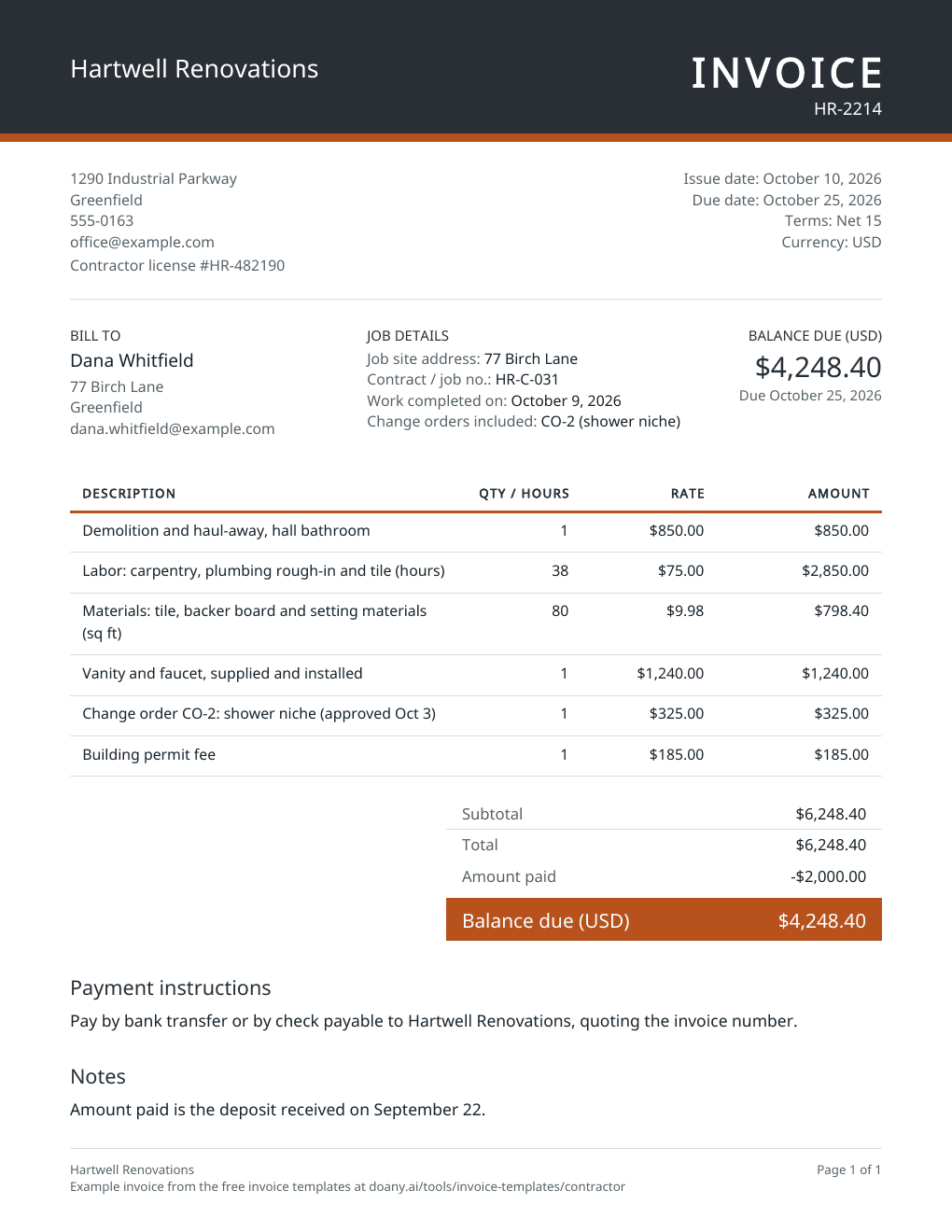
The example is the final invoice for a bathroom remodel: labor, materials, one approved change order and a permit, less the deposit taken at signing.
Name the job
Enter your business details, your license number with its label if you show one, and the client. Then fill in Job details, beside Bill to: the job site address, the contract or job number, the date the work was completed and the change orders included.
Split labor, materials and changes
Bill labor by the hour or as fixed-price lines, list materials by the unit, and give every approved change order its own line with its number. Pass-through costs such as permits go on their own line too.
Take off the deposit, then download
Enter the deposit you received in Amount already paid, and the invoice shows the total, the payment and the balance due. Choose the terms in your contract, press Update invoice, check the preview and download the PDF.
Fit the invoice to the stage of the job
Larger jobs are often billed in stages. Each stage uses the same template with different lines.
Deposit at signing
What to change
Bill the deposit your contract sets as one line, such as “Deposit, 30% of contract HR-C-031”, and leave Amount already paid blank.
Before you use it
Check the amount against the contract, and against any limit your state puts on deposits for home improvement work.
Progress payment
What to change
Bill the work done in this stage, line by line or as the stage amount in the contract, and name the stage in the description.
Before you use it
Make sure no work or payment from an earlier stage is billed again.
Final invoice
What to change
List the whole job, the approved change orders and the fees, and enter every payment already received in Amount already paid.
Before you use it
The balance due should be the contract price plus approved changes, minus what the client has paid.
Check the contractor invoice before you send it
- Every change order on the invoice was approved by the client.
- Material quantities match what was delivered or installed.
- Amount already paid includes only money you have received.
- Any tax is charged the way your state taxes this work; leave Tax rate blank if it does not apply to the whole invoice.
- The terms and due date match your contract.
How the deposit comes off
The editor adds the lines into a subtotal, takes off any discount, charges tax at one rate on what is left, then subtracts Amount already paid to give the balance due. In the example, $6,248.40 less the $2,000.00 deposit leaves $4,248.40.
When only part of the job is taxable
States tax construction work in different ways: some tax the materials, some the whole job, and some expect the contractor to pay the tax when buying materials. The editor applies one rate to the whole invoice. If only part of yours is taxable, work out that tax yourself, add it as its own line and leave Tax rate blank.
Made in your browser
The editor builds the preview and the PDF in this browser. It keeps only your latest invoice, on this device, and does not email the invoice, take payments or mark anything as paid; a Pay online link prints as you paste it and goes to your own payment page. Download the PDF or text to keep a copy. An AI answer in the chat sends the invoice’s details with your question, but never your logo, your signature picture or your Pay online link.
Useful answers
What should a contractor invoice include?
Your business name, contact details and any license number you show, the client and the job site, an invoice number and date, labor, materials, change orders and fees on separate lines, the total, payments received, the balance due and the due date.
How do I show a deposit on a contractor invoice?
List the whole job on the lines and enter the deposit in Amount already paid. The invoice then shows the total, an Amount paid line and the balance due. Do not also lower a line price by the deposit, or the client is credited twice.
Should labor and materials be on separate lines?
Separate lines show the client what they are paying for and make change orders easier to check. Bill labor by the hour, with the hours as the quantity, or as a fixed price, and list materials by the unit, such as square feet of tile.
How do I bill a change order?
Add each approved change as its own line with its number and the date it was approved, such as “Change order CO-2: shower niche (approved Oct 3)”. Keep the signed change order with your copy of the invoice.
Can I print a blank contractor invoice?
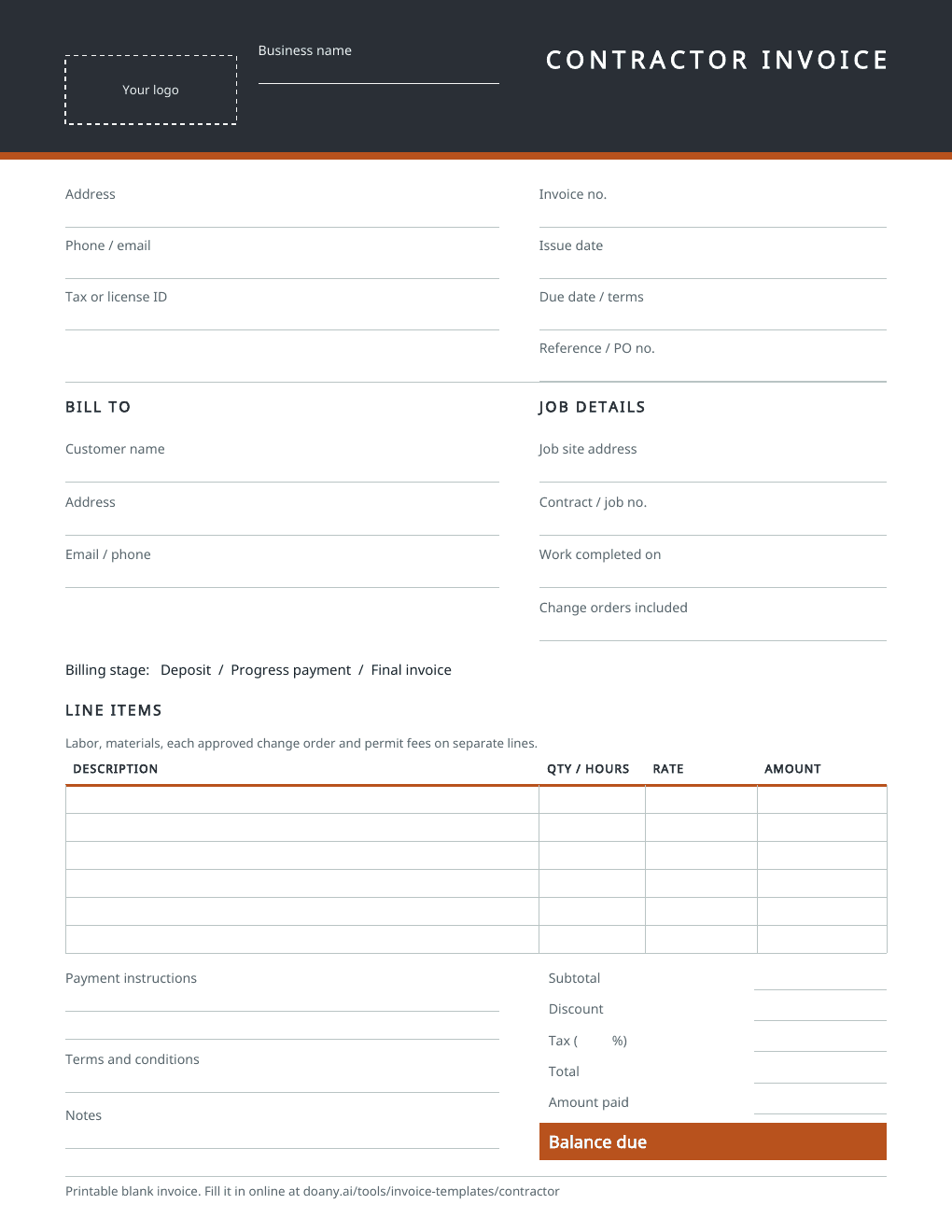
Yes. The blank PDF has spaces for the job site, the contract number, the billing stage, labor, materials, change orders, deposits and the balance. It comes on US Letter and A4 paper. To fill it in on screen instead, edit the example on this page and download your own PDF.
Is this contractor invoice template free?
Yes. Download the blank or filled PDF, or edit the example and download your own, with no account. The PDF is made in your browser.