For service professionals and small teams
Free scope of work generator
Use the scope of work generator to define included work, exclusions and completion checks. Edit the filled document and download a PDF without adding prices.
- Free to use
- No account needed
Your scope of work
Download PDF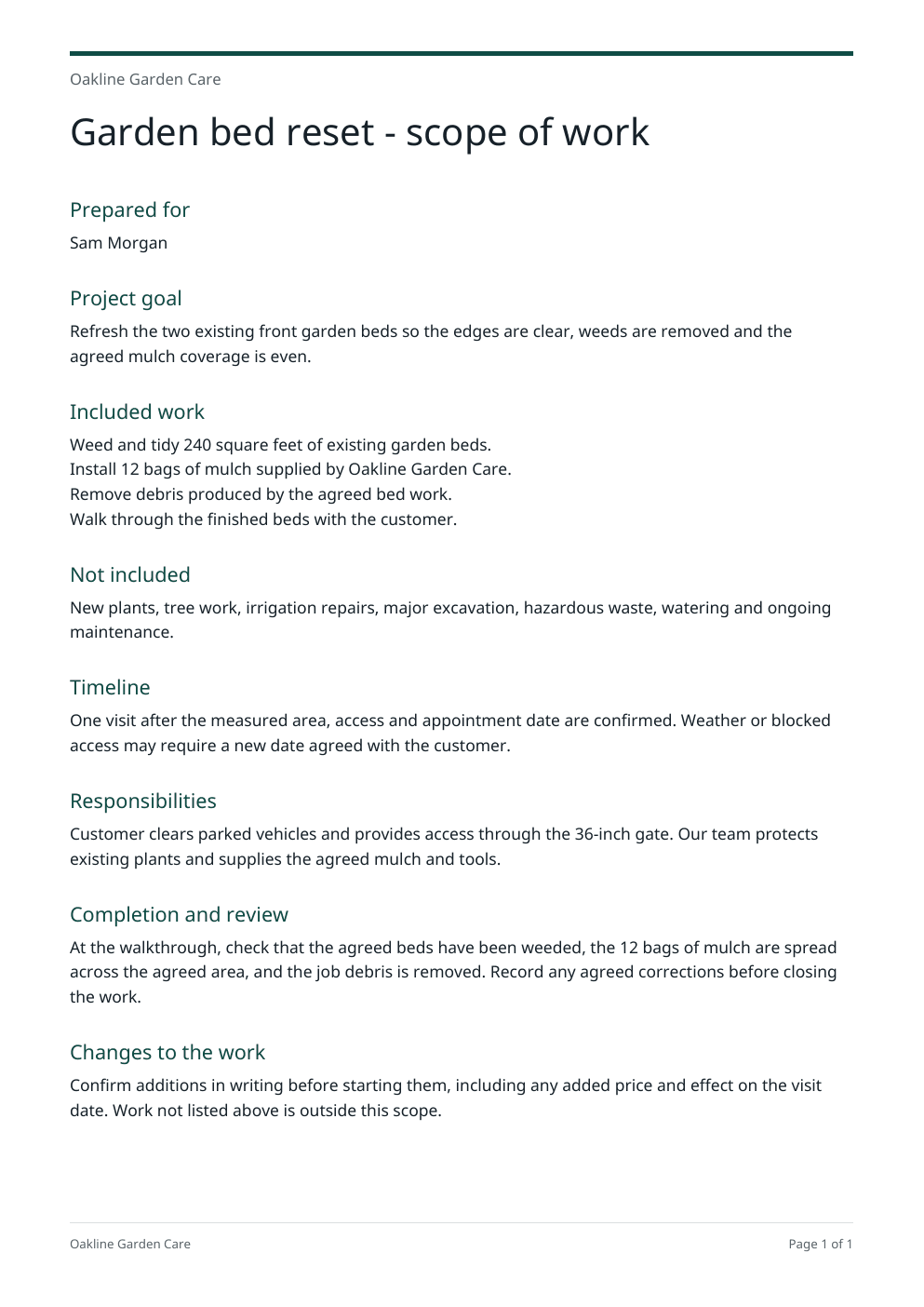
Review the work, exclusions and completion checks before sharing.
Change the work details
Use your actual job details. Updating these fields does not send or approve the document.
Use it from an AI browser
This page has site tools: actions an AI agent can call directly, with no plugin or API key. The ChatGPT desktop app’s browser can use them where site tools are available, and so can Chrome with WebMCP turned on. The agent works on this page, with the same steps and limits as its buttons, so you can check the result before you use it.
Open doany.ai/tools/scope-of-work-generator and write a scope of work for Brightline Tile & Grout regrouting the 60 sq ft master bathroom shower for customer Dana Whitfield, excluding tile replacement and plumbing, done in one day once the grout color is confirmed, with a walkthrough to check the finished joints.
Site tools work only while this page is open. They never send messages, invoices or payments for you.
Define finished work with the scope of work generator
The scope of work generator gives both sides a shared list of deliverables and boundaries. The document can accompany a proposal or agreement without becoming a price sheet.
Name the result and included work
Enter the customer goal and deliverables in the scope of work generator. Use quantities, locations or formats when they matter. A reader should be able to tell whether each deliverable has been provided.
Set boundaries and dependencies
List exclusions, customer responsibilities, timing assumptions and the process for agreeing extra work. State who provides access, content, materials or decisions.
Check the definition of done
Add completion checks and revision limits in the scope of work generator. Edit the wording, then download the PDF to share alongside your separately reviewed commercial terms.
Scope changes with the type of work
Keep the draft from the scope of work generator focused on what you will deliver and what the customer needs to provide.
Garden or exterior service job
What to change
Name the measured work area, material allowance, access and debris handling. Exclude repairs or ongoing care unless agreed.
Before you use it
The walkthrough should check the same work and quantities listed in the scope.
Website or creative project
What to change
List page or file counts, supplied assets, revision rounds and handover in the scope of work generator. Record who approves the work.
Before you use it
Do not leave additional formats, integrations or unlimited revisions implicit.
Recurring service
What to change
Describe the tasks and visit frequency, customer preparation and the review process for extra requests.
Before you use it
Separate recurring tasks from one-off additions and say how changes will be agreed.
Review the draft from the scope of work generator as a customer
- Each deliverable has a clear quantity, location or completion check.
- Exclusions name likely assumptions rather than saying only “extras”.
- Dates depend on clearly stated access, content or customer decisions.
- Changes and revisions have a stated review process.
A scope can stand apart from pricing
Use the scope of work generator when you need agreement on the work before choosing a price or when prices belong in a separate proposal. It contains no compulsory fee table, so it works for internal briefs, subcontractor instructions and customer walkthroughs.
Make changes discussable
Specific exclusions and responsibilities give you a shared reference when a request changes. Write down the addition, its impact on time and price, and the decision before doing extra work. The tool records your wording; it does not approve changes for either party.
Sources checked on October 4, 2026: Dave: contractor scope of work builderSlashit: scope boundaries and dependenciesopens in a new tab
Questions about this tool
What should a scope of work include?
In the scope of work generator, include the project goal, customer and provider, deliverables, exclusions, timeline, responsibilities, completion checks and the change process. Add details that help both sides resolve an ambiguity by reading the document.
What is the difference between a scope of work and a proposal?
A scope defines the work and its boundaries. A proposal can also explain the client problem, your approach, proposed fees and the next commercial step. Use the scope alone when you do not need a priced offer.
Do I need to include prices in a scope of work?
No. The scope of work generator creates a scope without a compulsory pricing table. You can keep fees and payment terms in a separate proposal or agreement and attach the scope as the work description.
How do I write exclusions to prevent scope creep?
Name work a customer might reasonably assume is included, such as extra pages, materials, maintenance, disposal or additional revisions. Describe how additions will be reviewed rather than relying only on a vague “not included” sentence.
How do I define acceptance criteria or completion checks?
Describe what both sides will inspect: the agreed area cleaned, files delivered, pages checked, material quantity installed or review round completed. Use checks you can verify and state who reviews the work.
Can I use this for contractors, freelancers and creators?
Yes. Change the filled details to match your job. Contractors can describe areas, materials and access; freelancers and creators can describe pages, files, revision limits and handover. The scope of work generator does not add trade-specific legal terms.
Can I edit and download the scope of work as a PDF?
Yes. The filled scope is visible when the page opens. Change the details, edit any document section and download a PDF. Invalid inputs or a failed export preserve your last completed document.
Does this create a signed agreement or approve the scope?
No. It creates a draft document from your wording. It does not collect acceptance, apply an electronic signature, send the document or determine whether its terms meet your needs. Review the scope with the people doing and receiving the work.