For cleaning businesses
Free cleaning estimate template (printable PDF)
Use the cleaning estimate template to list rooms, cleaning level, packages and add-ons. Print the blank PDF, or edit the filled example and download it.
- Free to use
- No account needed
Choose your template
Download a blank PDF to print, view the filled example, or edit the estimate online.
Your customer estimate
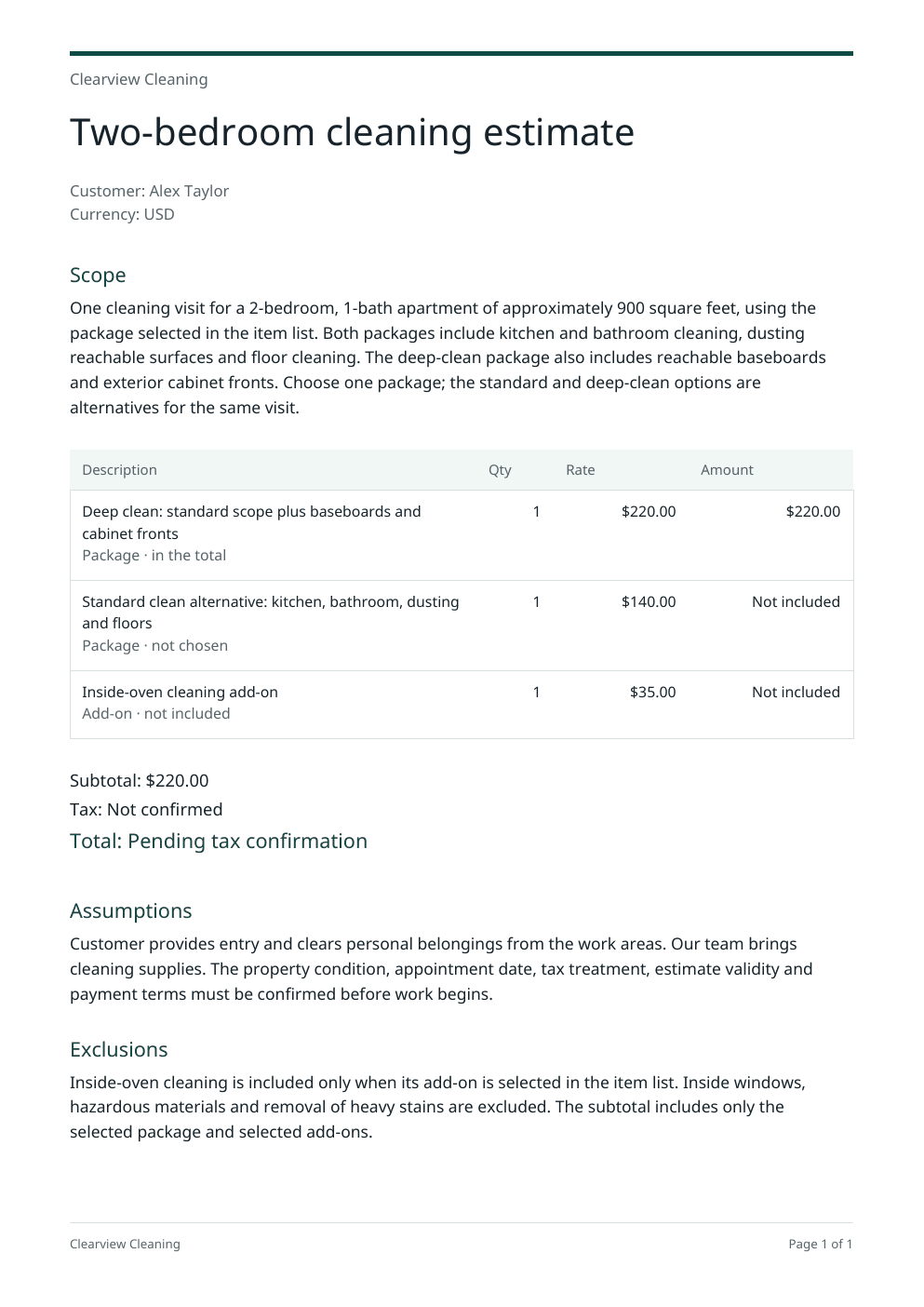
A customer-ready PDF estimate with the scope, line items and selected prices.
Total before tax$220.00
Edit documentTitle and 3 sections
More optionsSave, download text or start over
PDF branding
Keep a copy
Save a private draft for 24 hours. Sign in or create an account to reopen it.
Start over
Clearing the form also removes this draft.
Total before tax$220.00
Your details
Your estimate prices
Enter the prices you agreed for this job. They appear on the customer PDF.
Customer and currencyAlex Taylor · USD
Items3 items · $220.00
Not sure what to charge?
Work it out from your costs in the cleaning pricing calculator. Its “Use this price” button adds the price here for you and keeps what you typed.
Line total: $220.00
Package · in the totalDeep clean: standard scope plus baseboards and cabinet fronts1 × $220.00
Line total, not in the estimate total: $140.00
Package · not chosenStandard clean alternative: kitchen, bathroom, dusting and floors1 × $140.00
Line total, not in the estimate total: $35.00
Add-on · not includedInside-oven cleaning add-on1 × $35.00
Discount and taxNo discount · tax not confirmed
Tax is worked out after the discount.
- Subtotal
- $220.00
- Tax
- Not confirmed
- Total before tax
- $220.00
Total before tax$220.00
Use it from an AI browser
This page has site tools: actions an AI agent can call directly, with no plugin or API key. The ChatGPT desktop app’s browser can use them where site tools are available, and so can Chrome with WebMCP turned on. The agent works on this page, with the same steps and limits as its buttons, so you can check the result before you use it.
Open doany.ai/tools/cleaning-estimate-template and write a move-out cleaning estimate for Fresh Nest Cleaning in Tampa for Mark Ellis's 3-bedroom, 1,400 sq ft apartment, with 10 cleaner-hours at $45, a $60 oven add-on and 7% tax.
Site tools work only while this page is open. They never send messages, invoices or payments for you.
Complete your cleaning estimate template from the job scope
Start your cleaning estimate template with the rooms and cleaning level, then set your prices. The selected package and add-ons decide the total.
Describe the property and visit
Adapt the cleaning estimate template to the bedrooms, bathrooms, size, cleaning level and frequency. State who provides entry and supplies, and describe heavy buildup before promising the work.
Set the package and add-ons
Enter your own prices. Select one package, then choose any agreed add-ons. A standard and a deep-clean alternative should not both be charged for the same visit.
Check the customer copy
Review the customer name, scope, exclusions, tax and validity in your cleaning estimate template. After an edit, update the PDF so the download matches the latest document.
Choose the scope for this cleaning job
Adapt the cleaning estimate template to different visits, with a specific promise for each one.
Recurring standard clean
What to change
Enter the visit frequency, included rooms and agreed number of visits. Price one visit or label a multi-visit quantity clearly.
Before you use it
Does the price mean one visit, a month or the full agreed schedule?
First deep clean
What to change
For a deep-cleaning estimate template, describe the condition, reachable baseboards, cabinet fronts and agreed extras. Select the deep-clean package and leave the standard alternative unselected.
Before you use it
Are inside appliances, windows and heavy stains included or excluded?
Move-out clean
What to change
Record whether the property is empty, how keys are supplied and which appliances or cabinets need interior cleaning.
Before you use it
Confirm access and completion expectations; do not promise a deposit refund.
Before you send the cleaning estimate
- The selected package matches the written cleaning scope.
- Optional extras are selected only when the customer agreed to them.
- Visit frequency, supplies, access and exclusions are clear.
- Your prices, currency and tax treatment are confirmed.
- The current PDF contains the correct customer and latest edits.
Packages and add-ons in the cleaning estimate template
A standard clean and a deep clean are alternatives for one visit. Pick one package. An oven clean or another agreed extra is an add-on, so it joins the subtotal only when selected. The filled template makes that distinction visible in the customer PDF.
Set your own rates from the work involved
The loaded dollar amounts are fictional starting figures, not recommended cleaning rates. Use your labor, supplies, travel, overhead and desired profit to choose prices. Property size alone does not capture condition, access or the difference between routine and deep cleaning.
Keep the estimate and the finished invoice distinct
A cleaning estimate template describes proposed work and price assumptions. After the job, an invoice records the amount billed under the agreement. Confirm changes with the customer and keep a downloaded copy; this tool does not send estimates, take payments or create invoices.
Questions about this tool
What should a cleaning estimate include?
Fill the cleaning estimate template with the customer, property size or rooms, cleaning level, visit frequency, included tasks, exclusions, access and supplies. Add your package price, agreed extras, currency and confirmed tax or validity details. Download the current PDF after review.
How do I estimate a house cleaning job?
List the work and property condition, estimate the labor and supplies required, add travel and overhead, then choose your price. Use the cleaning pricing calculator if you need help with the math. This template organizes your scope and customer prices; it does not supply local market rates.
Can I use this for deep, move-out or janitorial cleaning?
Yes. Adjust the cleaning estimate template to the cleaning level, rooms, condition, access and included tasks. For janitorial or office cleaning, list the areas, such as offices, restrooms and floors, and the visit frequency, then price each visit or area as a line. Spell out interior appliances, cabinets or windows if included, and remove promises that do not fit the job.
How do I show weekly or biweekly cleaning?
Enter the frequency in Visits and frequency. State whether each line covers one visit or a defined number of visits, then use that quantity consistently. The tool does not schedule visits or create a recurring billing agreement.
Will an unselected oven-cleaning add-on increase the total?
No. Unselected optional items remain visible as options but are excluded from the subtotal. Select an add-on only when it belongs in the agreed work, and check the resulting total before downloading.
Can I edit and download the cleaning estimate without an account?
Yes. Edit the filled document and item prices locally, create an updated PDF and download it without signing up. AI scope drafting and saving are available only when enabled on this deployment.
Why did the PDF preview become out of date?
Edits to the cleaning estimate template, business branding or prices invalidate the old PDF. Your changes remain in the workbench. Create or update the PDF to preview and download the current version.
Does the cleaning estimate set taxes or payment terms for me?
No. The cleaning estimate template starts with tax unconfirmed and asks you to confirm payment terms and validity. Enter only the tax treatment and terms that apply to your business and this job.