For cleaning businesses
Free cleaning invoice template
Bill each clean, the add-ons the client asked for and any supplies on one invoice, with the visit dates they can check. Print the blank PDF, or edit the filled example below and download your own.
- Free to use
- No account needed
Choose your template
Download a blank PDF to print, view the filled example, or edit the invoice online.
Also on A4 paper: blank · filled example
Your invoice
Check the customer details, tax and payment terms before you send it. This page does not send the invoice or record payments.
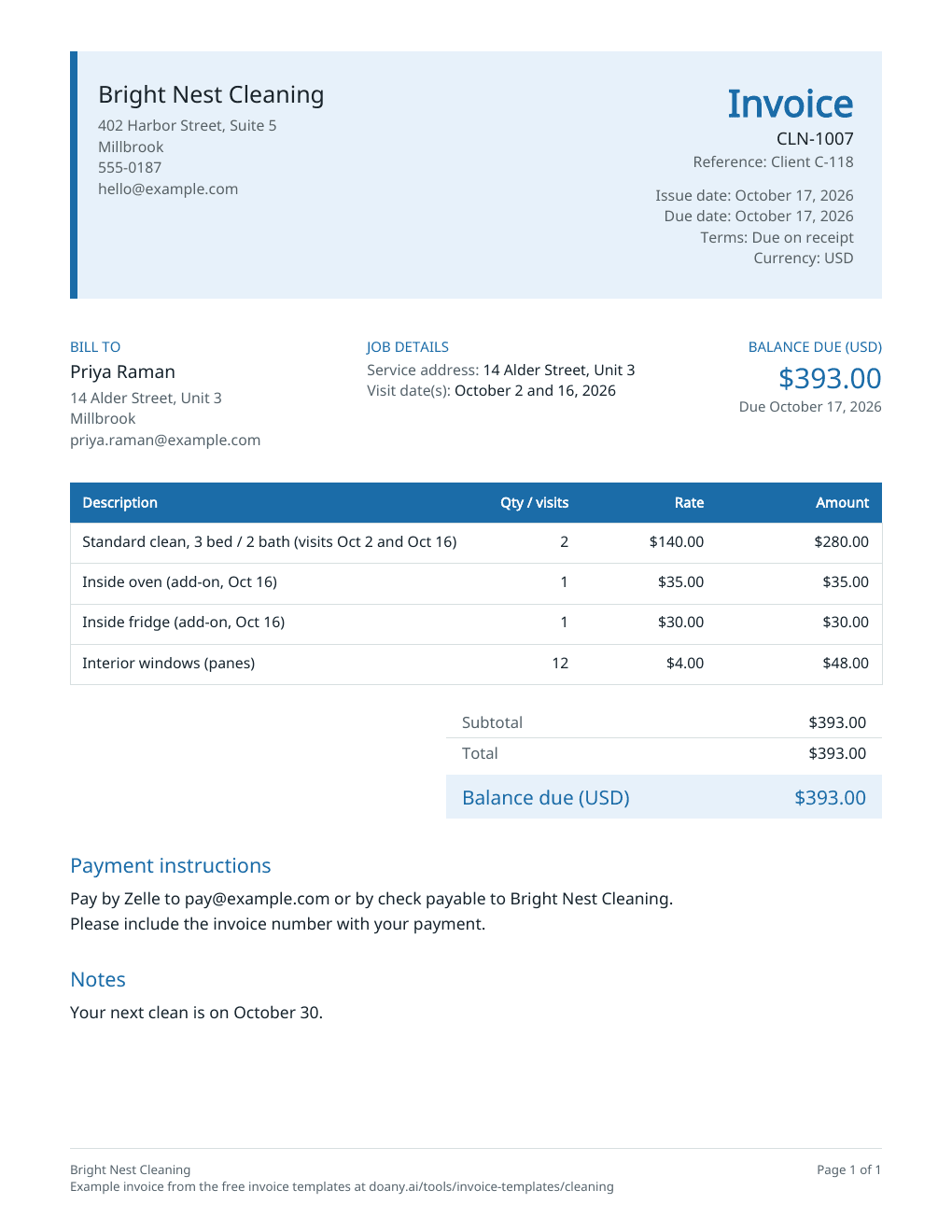
$393.00Balance due in USD, by October 17, 2026
- Total
- $393.00
- Amount paid
- $0.00
Your changes are kept on this device as you work.
Invoice details
Use your real business and customer details.
Your invoice is built in this browser and the latest one is kept on this device until you press Forget on this device. Download a copy to keep it.
What a cleaning invoice shows
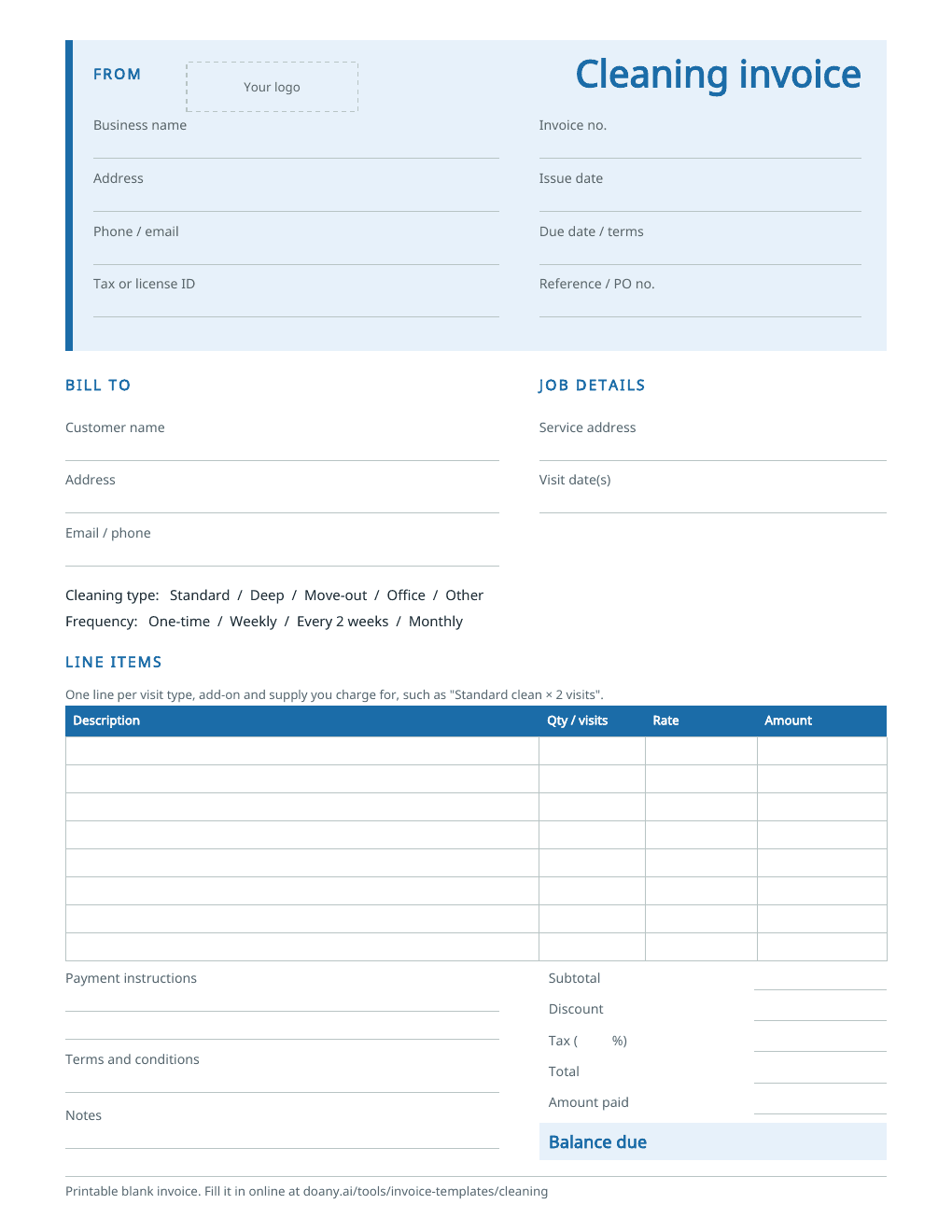
- Service address
- In Job details, beside Bill to. It can differ from the billing address, such as a rental the client manages.
- Visit dates
- In Job details, under Visit date(s), and in the line’s description, so the client can match each visit to their calendar.
- Cleaning type and home size
- In the line’s description: “Standard clean, 3 bed / 2 bath”.
- Add-ons the client asked for
- Each on its own line, such as inside the oven, or interior windows by the pane.
- Supplies you charge for
- Their own line, so the client sees what was used.
- Client or plan number
- In Reference or PO number, printed under the invoice number.
Fill in the cleaning invoice
The example bills a client on an every-two-weeks plan for two visits and three add-ons. Replace each detail with your own, then check the total before you send it.
Put your business and the client at the top
Enter your business name, address, phone and email, then the client’s name and billing address. Add the address you clean and the visit dates in Job details, beside Bill to.
List each visit and add-on
Give each type of visit its own line, with the number of visits as the quantity and your price per visit as the unit price. Add the extras the client asked for, such as inside the oven or fridge, as separate lines, and windows or blinds by the count if you price them that way.
Set the terms and download
Use a new invoice number, the issue date and the terms you agreed: Due on receipt suits a one-time clean, and a regular client may have Net 7 or Net 15. Write how the client can pay, press Update invoice, check the preview and download the PDF.
Fit the invoice to the clean
What changes between jobs is how you count the work and where the dates go.
A regular client
What to change
Bill the period’s visits on one line, with the number of visits as the quantity, and list the visit dates in Job details.
Before you use it
The number of visits should match the dates you list, after any skipped or moved clean.
A one-time deep or move-out clean
What to change
Bill the clean as one line at the price you quoted, with each extra the client approved on its own line.
Before you use it
Check the price against the estimate the client accepted, and add only the extra work they agreed to.
An office or commercial clean
What to change
Bill the month’s cleans by the visit or as one monthly fee, and put the client’s purchase order number in Reference.
Before you use it
Use the billing period and PO number the client’s accounts team asks for, so the invoice can be matched and paid.
Check the cleaning invoice before you send it
- The number of visits and their dates match your schedule for the period.
- Every add-on on the invoice is one the client asked for.
- The service address is on the invoice if it is not the billing address.
- Any tax rate is the one that applies to cleaning where you work; leave it blank if none applies.
- The invoice number has not been used on another invoice.
Visits, add-ons and supplies on separate lines
A client who sees “Standard clean × 2” and each extra on its own line can match the invoice to their calendar and to what they asked for. The editor multiplies each line’s quantity by its unit price and rounds to the cent, so 12 window panes at $4.00 come to $48.00.
Tax on cleaning services
Whether cleaning is taxed depends on the state, and sometimes on whether the clean is for a home or a business. The example has no tax. If tax applies to your service, enter its rate in Tax rate, and the editor charges it on the subtotal after any discount. Your state’s revenue department or your adviser can confirm the rate.
Made in your browser
The editor builds the preview and the PDF in this browser. It keeps only your latest invoice, on this device, and does not email the invoice, take payments or mark anything as paid; a Pay online link prints as you paste it and goes to your own payment page. Download the PDF or text to keep a copy. An AI answer in the chat sends the invoice’s details with your question, but never your logo, your signature picture or your Pay online link.
Useful answers
What should a cleaning invoice include?
Your business name and contact details, the client’s name and address, an invoice number, the issue and due dates, each visit and add-on with its price, the total and how to pay. Add the service address and visit dates, so the client can match the invoice to the work.
How do I invoice a recurring cleaning client?
Send one invoice per billing period, such as every two weeks or every month. Put the visits on one line with the number of visits as the quantity, list the dates in Job details, and give each period’s invoice a new number.
How do I charge for cleaning supplies?
Add the supplies you charge for as their own line, with the quantity and your price, such as a refill of a product the client asked for. Leave out supplies your visit price already covers.
Can I turn my cleaning estimate into an invoice?
Yes. On DoAny’s cleaning estimate template, press Make an invoice from this estimate: this page opens with the lines the client accepted, their prices and the client’s name filled in. Add the visit dates and any extra work they approved after the estimate, then check the invoice and download it.
Can I print a blank cleaning invoice?
Yes. The blank PDF has spaces for the service address, the visit dates, the cleaning type and frequency, each line and the totals. It comes on US Letter and A4 paper. To fill it in on screen instead, edit the example on this page and download your own PDF.
Is this cleaning invoice template free?
Yes. Download the blank or filled PDF, or edit the example and download your own, with no account. The PDF is made in your browser.